About React.JS

Q1. What is React?
Ans - Basically React is an open-source JavaScript library, and with the use of react, we can build single-page applications and user interfaces. and also react.js allows to us create reusable UI components.
Q. Why do we use React.JS?
Ans :-
- it creates single-page web applications.
- it has reusable components.
- it has tools for easy debugging.
Q. What is the Difference between Angular vs React.Js?
Ans :-
- Angular is a Javascript Framework. whereas React.Js is a Javascript library.
- Angular allows to create of MVC (Model-view-controller). whereas React.JS can't create MVC architecture.
- Angular has templates based on HTML. whereas React.JS has JSX and with help of JSX we can write HTML in React.
Features of React.JS:-
1 . JSX :- JSX is JavaScript XML. JSX allows to us write HTML in react. and JSX makes it easier to write and add HTML in react.
Const test = <h1>Hello world</h1>
2 . Components:- Components are nothing but only code or functions. which have their own logic or controls. components can be reusable.
export Function myFunc(){
      console.log("Hello world")
}
components are two types:-
- Class-based Component
- Functional-based Component
Q. What is Higher Order Function?
Ans:- Higher Order Function is a Function that takes a function as an argument and returns a function as an output. Map, Filter, and Reduce are Higher Order functions.
const arr= [2,3,4,56,33]
const res= arr.map((item )=>{
    return item+2
})
console.log(res)  /// output :- [ 4,5,6,58,35]
Q. What is Higher Order Component or HOC?
Ans :- Higher Order Component is a Function that takes a component as an argument and returns a component as a output.
Q . What is a Pure Component?
Ans :- Pure components in React is the component which does not re-render when the value of state and props are updated with the same values.
Q . Controlled component and Uncontrolled component:-
Ans:-
controlled component is under control of the states. whereas uncontrolled component is under the control of dom.
Controlled component access by React state. whereas uncontrolled component access by useRef or dom .
unControlled component-
import React, { useRef } from 'react';

function App() {
const inputRef = useRef(null);

function handleSubmit() {
    alert(`Name: ${inputRef.current.value}`);
}

return (
    <div className="App">
    <h3>Uncontrolled Component</h3>
    <form onSubmit={handleSubmit}>
        <label>Name :</label>
        <input type="text" name="name" ref={inputRef} />
        <button type="submit">Submit</button>
    </form>
    </div>
);
}

export default App;
Controlled Component :-
import { useState } from 'react';

function App() {
const [name, setName] = useState('');

function handleSubmit() {
    alert(`Name: ${name}`);
}

return (
    <div className="App">
    <h3>Controlled Component</h3>
    <form onSubmit={handleSubmit}>
        <label>Name:</label>
        <input name="name" value={name} onChange={(e) => setName(e.target.value)} />
        <button type="submit">Submit</button>
    </form>
    </div>
);
}

export default App;
3 . Dom:- Dom is the Document object model and its a programming API(interface) for HTML and XML. it is defined to the logical structure of HTML that are represent in the webpage or web app.

4 . Virtual DOM:- Virtual Dom is just a copy of real dom. every time when the state of the application will change, the virtual Dom will update instead of the real dom. then it checks the difference between the pre-virtual dom tree and the new virtual dom. once it has done, the real dom will update only the things which have actually changed.

It has Two algorithms -
Reconciliation - Virtual Dom synced with the real Dom by ReactDom library. this process is called Reconciliation.
Diffing - The Process of checking the previous virtual dom tree and new virtual dom tree. this process is called Diffing.

Advantages of React.JS -
- easy to learn and see.
- Reusable components.
- single-page application.
Disadvantages or limitations or react.js:-
Lack of proper documentation:- Some developers think that React technologies are updating so fast that there is no time to document
JSX as a Barrier:-
Development speed slow:-
Q. What was a Class-component:-
Ans- Class-based component is a way to track state and lifecycle methods in react component. and in class-based components, the render method will be called whenever the state of the component changes.
Q. What is a Functional based component:-
Ans - Functional-based components are nothing but only javascript functions. we can create with the function keyword and arrow functions. Function components accept data or props and return the React element(JSX).
Q. What are the Lifecycle methods of in-class components?
Ans - each React class component has lifecycle methods and this lifecycle method works with three main phases.

Mounting phase:- in the mounting phase, we can add elements into the dom.
Updating phase:- in updating phase component is updated whenever any changes in the component state or props.
Unmounting phase:- in unmounting phase component is removed in the dom.
Class component has lifecycle methods:-
componentDidMount :- componentDidMount() methods is called after the component is rendered.
componentDidUpdate :- componentDidUpdate() methods is called when the component is update in the dom.
componentWillUnmount :- componentWillUnmount() methods is called when the component is removed from the dom .

Q. what is the difference between a class-based component and a functional-based component?
Ans:-
Class component works with lifecycle methods. whereas functional component works with hooks.
Class component requires you to extend from React. component and create a render function that returns the react elements. whereas function components are just plain javascript functions which is takes props as an argument and return react element(JSX).
Class component syntax is very complicated as compared to the functional component. whereas functional component syntax is easy to write and easy to understand.
Q. What is State in React.JS?
Ans :- State is a built-in React Object that can contain all information or data of a component.
whenever the state is update, the component will re-render.

Q. What is props?
Ans :- Props are parameters of the components. and with the help of props, we can share our data to components. props are read only.
function Car(props) {
  return <h2>I am a { props.brand }!</h2>;
}

function Garage() {
  return (
    <>
      <h1>Who lives in my garage?</h1>
      <Car brand="Ford" />
    </>
  );
}
Q. What is props drilling?
Ans :- props drilling is a way to send the data parent function to the child function.

Q . What is the difference between state and props?
Ans :-
Props are passed from one component to another component. whereas states are passed within components.
We can't modify props because props are read-only. whereas we can modify states.
Q. What are Hooks in React.JS?
Ans:- with the use of Hooks we can access state and other React features without writing a class in functional components.
Advantages of Hooks:-
- Reusability
- readability
Hooks:-
- useState:- useState is a hook and with help of useState we can create a state variable in the functional component. usestate accepts an initial value and returns two values first is the state and the second is a function that updates the state.
const [ state , setState ] = usestate( initial value )

2 . useEffect :- useEffect is a hook and with the help of useEffect we can perform the side effect in the functional component.
Side effect means ?
Side effect means when we need to reach into an outside world such as fetching data from the API or working with the dom.
and useEffect takes two arguments first is a callback function and the second is dependency.
useEffect(() => {
   console.log("Hello world")
  });
- Empty array [ ]:- if we added an empty array in the dependency component only the one-time render when the page is refresh.
useEffect(() => {
   console.log("Hello world")
  },[ ]);
- State in array [state]:- if we added state in the dependency, whenever the state will update only that time component will render.
useEffect(() => {
   console.log("Hello world")
  },[ state ]);
- Nothing in dependency:- if we have not added anything in dependency, the component every time renders whenever anything is updated in the component.
useEffect(() => {
   console.log("Hello world")
  });
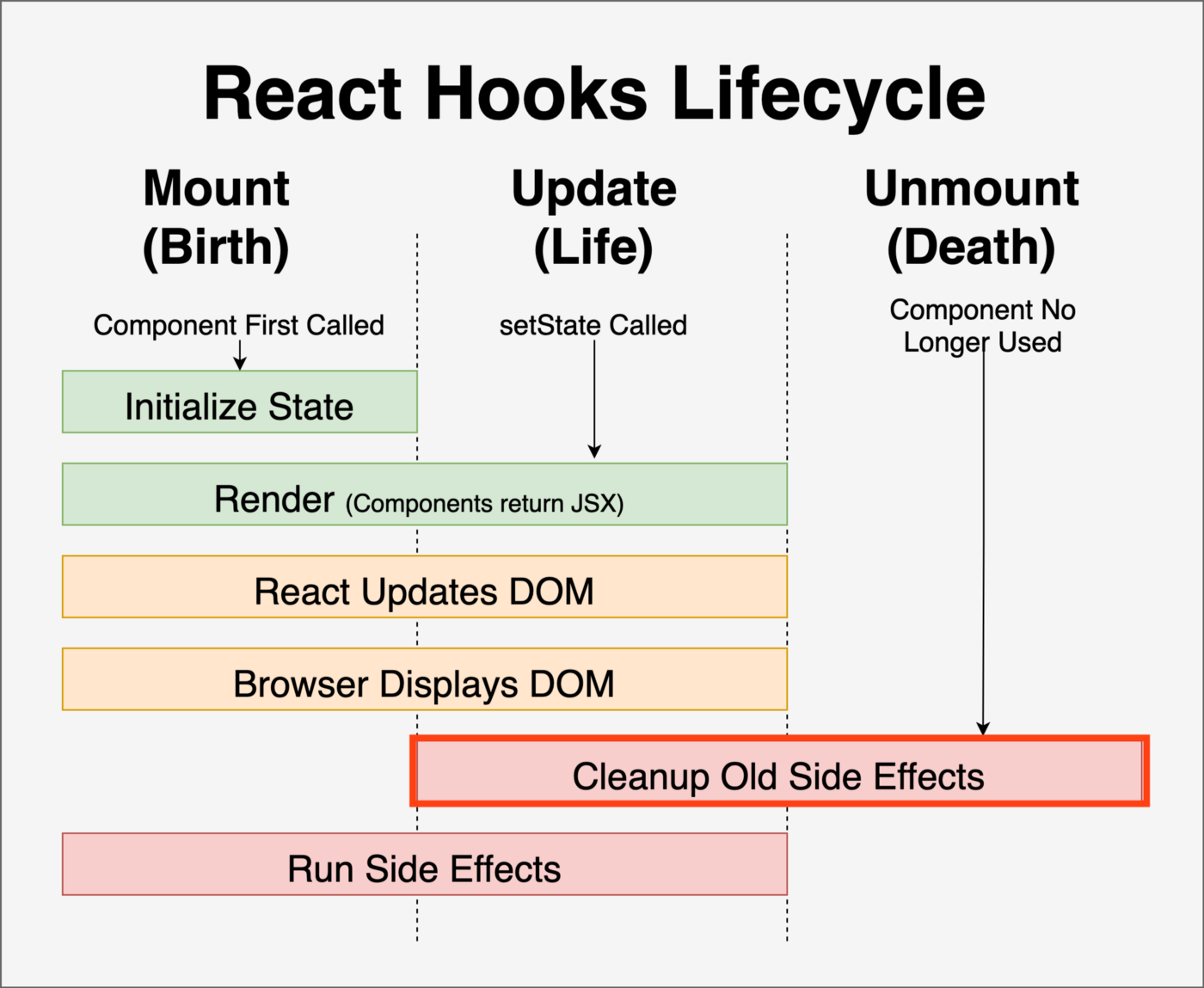
Q. What is Cleanup Function in UseEffect ?
useEffect returns a function that is called the cleanup function, with the help Cleanup function we can easily clean up the side effects. when the callback function returns a function, React will use that function as a cleanup function.
useEffect(() => {
   console.log("Hello world")

    return ( )=>{
          console.log(" cleanup the sideEffects.....")
}
  });
3 . useRef :- useRef is a Hook that can directly create a reference to the dom element in the functional component. and with the help of useRef we can directly manipulate dom elements.
function App() {
  const inputElement = useRef();

  const focusInput = () => {
    inputElement.current.focus();
  };

  return (
    <>
      <input type="text" ref={inputElement} />
      <button onClick={focusInput}>Focus Input</button>
    </>
  );
}
4 . Custom Hook:- When we have a component logic and multiple components need this logic so we can extract that logic to a custom hook. and use the custom hook in multiple components. custom hook starts with "use".
Create custom hook -
import { useState, useEffect } from "react";

const useFetch = (url) => {
  const [data, setData] = useState(null);

  useEffect(() => {
    fetch(url)
      .then((res) => res.json())
      .then((data) => setData(data));
  }, [url]);

  return [data];
};

export default useFetch;
use Custom hook in other components -
import useFetch from "./useFetch";

const Home = () => {
  const [data] = useFetch("https://jsonplaceholder.typicode.com/todos");

  return (
    <>
      {data &&
        data.map((item) => {
          return <p key={item.id}>{item.title}</p>;
        })}
    </>
  );
};
5 . useContext :- useContext provides data to components no matter how to deep they in component tree, useContext manages the state globally.
with the help of context, we can avoid props drilling.

How to use -
- creating context help of CreateContext
const UserContext = createContext()
- Providing the context help of the Provider
   <UserContext.Provider value={user}>
      <h1>{`Hello ${user}!`}</h1>
      <Component2 user={user} />
    </UserContext.Provider>
- Consuming the context help of useContext or custom hook
function Component5() {
  const user = useContext(UserContext);

  return (
    <>
      <h1>Component 5</h1>
      <h2>{`Hello ${user} again!`}</h2>
    </>
  );
}
- UseMemo :- useMemo is Hook . that is return memoized value .
useMemo is used to stop unwanted calling functions.
memoized value means we have stored value in the cache and if we need the same value, that time function does not recalculate the value.
usememo passed two argument callback functions and dependency.

7 . useCallback :- useCallback Hook similar to usememo . that is return memoized function .
useCallback is used to stop unwanted calling functions.
memoized function means we have stored value in the cache and if we need the same value, that time function does not recalculate the value.
useCallback passed two argument callback functions and dependency.
8 . useSelector :- useSelector is redux - hook that can access state from redux store with using selector function .
if we want use to state in our component so we can access by useSelector function and use it.
import React from "react";
import { useDispatch, useSelector } from "react-redux";
import { updateFirstName } from "../redux/actions";

const Form = () => {
  const dispatch = useDispatch();
  const nameObj = useSelector((state) => state.nameReducer);
  const { firstName } = nameObj;
  const handleFirstName = () => {
    dispatch(updateFirstName("Jason"));
  };

  return (
    <React.Fragment>
      <div className="container">
        <label>First Name : {firstName}</label>
        <button onClick={handleFirstName}>Update First Name</button>

        <label>Last Name : {lastName}</label>
        <button type="submit" onClick={handleLastName}>
          Update First Name
        </button>
      </div>
    </React.Fragment>
  );
};

export default Form;
8 . useDispatch :- useDispatch function is returns a reference to the dispatch function from the redux store . when we need to dispatch the action in our component that time we use the useDispatch function.
import React from 'react'
import { useDispatch } from 'react-redux'

export const CounterComponent = ({ value }) => {
  const dispatch = useDispatch()

  return (
    <div>
      <span>{value}</span>
      <button onClick={() => dispatch({ type: 'increment-counter' })}>
        Increment counter
      </button>
    </div>
  )
}
Q. What Strict Mode in React.JS?
Ans:- Strict mode is a tool for highlighting potential problems in a web application. strict mode does not render in any visible UI. they show the warning in the console. the strict mode only checks in development mode. they don't impact the production build.
How to use it?
- if we need to use a strict mode in React so we can put React. StrictMode in any component where we want.
which are errors that come when we add strictMode in React.
- warning about unsafe lifecycles.
2 . Warning about legacy string ref API.
3 . Warning about deprecated findDOMNode.
import React from 'react';

function StictModeDemo() {
return (
    <div>
    <Component1 />
    <React.StrictMode>
        <React.Fragment>
        <Component2 />
        <Component3 />
        </React.Fragment>
    </React.StrictMode>
    <Component4 />
    </div>
);
}
Q. What is the Difference between a stateful component vs a stateless component?
Ans:-
- Functional component also called stateless component. whereas the Class component is also called the stateful component.
- Stateful components can change the states. whereas stateless components can't change states.
Q. What is forwarding ref in React?
Ans :- Forwarding ref gives a reference of the dom to a child component. which is created by its parent component. with the help of forwarding, ref child component can manipulate dom elements.

Q. What are error boundaries in react.js?
Ans:- Error Boundaries are used to handle javascript errors in the child component. with help of Error Boundaries, we can show errors in the display (fallback UI) .


